

Anyone who regularly drives with children in the car knows that the journey itself is rarely the most stressful part. The stressful part is the two minutes before the car moves. Bags loaded, children buckled, snacks distributed, and then — the cable. Somewhere in the gap between the centre console and the phone mount, the USB lead has managed to tangle itself around the handbrake. Google Maps will not load until the phone is plugged in. The phone will not stay in the mount once it is plugged in. And from the back seat, the questions have already started. It is a small chaos, repeated every single day, and for the majority of parents it has simply been accepted as part of the routine. It does not have to be.
The solution is a wireless CarPlay adapter — a device roughly the size of a USB stick that plugs into the car’s existing port and eliminates the cable entirely. The Carlinkit wireless adapter store carries a full range of adapters compatible with the most common family cars on British and European roads, including Toyota, Volkswagen, Ford, Honda, BMW, Vauxhall, Peugeot, and Renault. Setup on the first use takes under two minutes. After that, the phone connects automatically the moment it is within range of the car — no plugging in, no tapping through menus, no waiting for the screen to recognise the connection.
Both iPhone and Android are supported through the same hardware, which matters in households where parents are on different phone ecosystems. Everything that normally runs through CarPlay — navigation, music, calls, messages read aloud — continues to work exactly as before. The only thing that disappears is the cable.

What Changes on the School Run
The difference shows up immediately in the texture of the morning routine. By the time the seatbelt clicks, the map is already loaded with the school route. The radio or morning playlist is already running through the car speakers. A message from another parent can be read aloud and replied to by voice without the phone leaving the bag. None of this requires touching the screen or reaching for the phone.
For mums who have spent years managing the dual challenge of keeping children calm in the back and staying focused on the road at the front, the reduction in cockpit friction is not a small thing. Every time a driver reaches for a phone — even briefly, even just to reconnect a cable — their attention divides. Removing that moment entirely changes the quality of attention available for the drive itself, which is the part that actually matters.
The improvement compounds across a week, a term, a full school year. Two hundred school runs without the cable routine is a meaningfully calmer two hundred school runs.
The Safety Case Is Stronger Than It Sounds
Distracted driving is consistently cited among the leading causes of road incidents involving families, and the research is unambiguous about what constitutes distraction. Brief manual interactions with a device — even those that feel automatic and habitual — register as cognitive interruptions in the same category as looking away from the road. The legal framework in the UK reflects this: hands-free operation while driving is a requirement, not a recommendation, and the penalties for non-compliance are significant.
A wired phone is technically hands-free once connected, but the act of connecting it is not. A wireless connection that completes before the car has moved removes that gap entirely. For parents whose instinct is to manage every variable before setting off, this is one variable that can simply be eliminated from the list.
Getting One Delivered Quickly in the UK and Europe
For mums based in the UK or elsewhere in Europe, Carlinkit EU is the dedicated regional platform covering this market. Products ship from within Europe, which means delivery to UK addresses is fast — typically within a few days rather than weeks. Warranty support is handled locally, without the complications of international returns, and EU consumer protection standards apply to every purchase made through the platform.
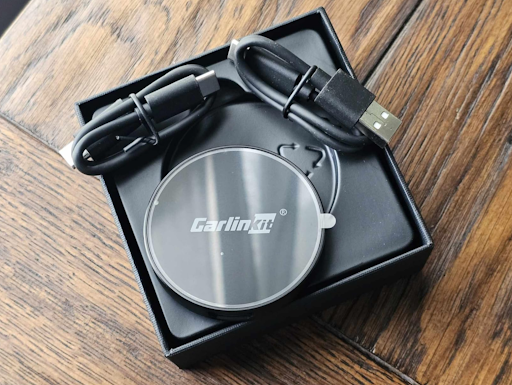
The site includes a compatibility checker that allows buyers to confirm, by make, model, and year, that the adapter will work with their specific vehicle before ordering. For anyone who has previously hesitated over a tech purchase because of uncertainty about compatibility or after-sales support, this removes the two most common reasons to delay. The process from search to doorstep is as straightforward as the device itself.
The Mums Who Will Get the Most Out of This
In practice, a wireless CarPlay adapter is useful for almost any driver still using a cable. But the return is highest for parents doing frequent short journeys — multiple trips in and out of the car each day — where the connection ritual accumulates into genuine daily friction.
That description fits the school run, the after-school activity circuit, the weekend supermarket run with a toddler in the back, and the longer family drive where the last thing anyone needs is a navigational fumble on an unfamiliar road. It also fits the commuting parent who needs calls and navigation running smoothly from the moment they leave the drive and does not have the spare attention to manage a temperamental cable connection while merging onto a busy road.
A Small Addition With a Long-Running Return
The best household upgrades are rarely dramatic. They are the ones that quietly remove a recurring frustration and make the day feel slightly more manageable as a result. A wireless CarPlay adapter does not change the school run, the commute, or the family road trip in any fundamental sense. What it does is take one consistently annoying part of all three and make it disappear.
For an investment that costs less than a family meal out, the return across a year of daily driving is difficult to overstate. It is the kind of thing that prompts the same reaction from almost every parent who tries it: a slight disbelief that they spent so long putting up with the cable.